
Entity Relationship Diagram
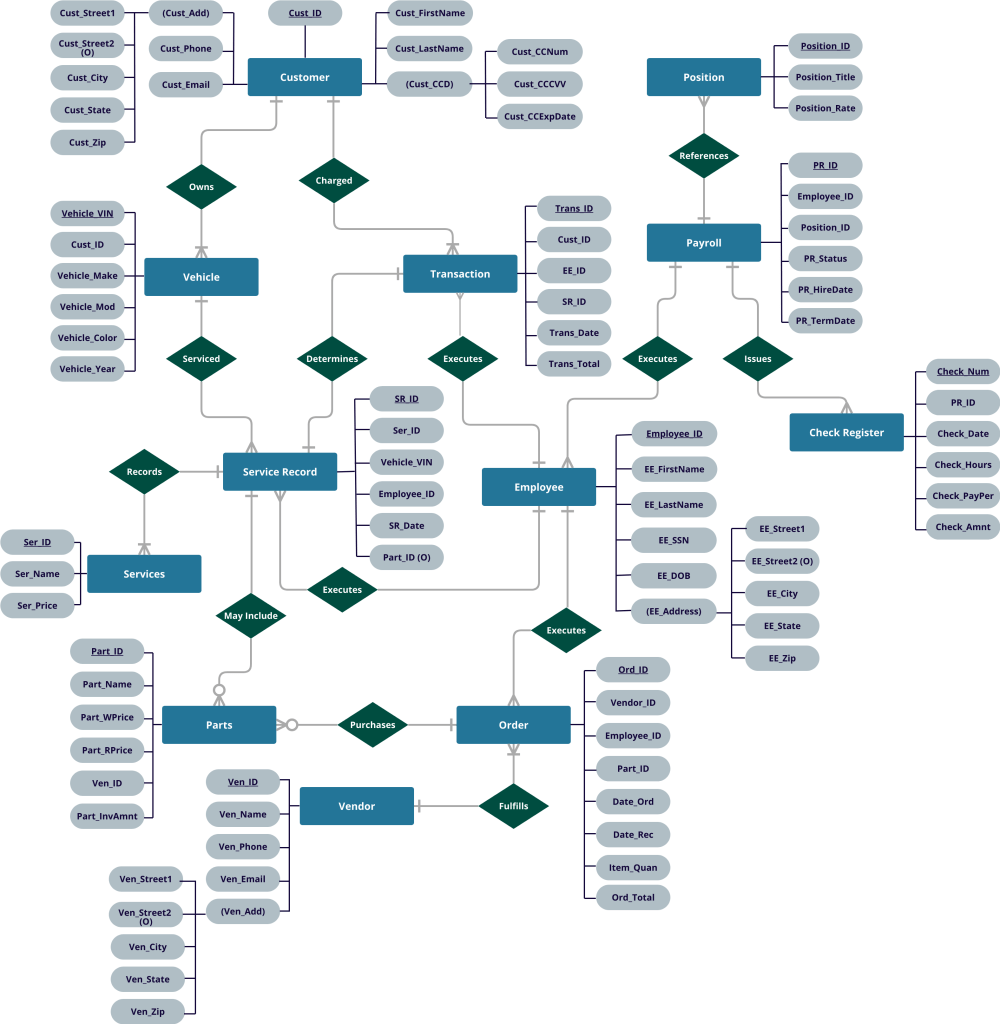
Below is an Entity Relationship Diagram (ERD) for an Auto Repair Shop database . The database is designed to fulfill the shop’s data needs by storing data pertaining to customers, employees, vendors, transactions, services, inventory and payroll.
Entities and Relationships
The Customer entity records the customer’s personal contact information and has the option to store credit card information for one card per customer. A customer’s vehicle information is stored in the Vehicle entity. Every vehicle must be associated with only one customer, but one customer can be associated with many vehicles.
The Employee entity stores each employee’s contact and personal information. Each employee is assigned a unique Employee ID which is used to identify the employee when completing customer transactions, submitting part orders, completing services, and receiving payment from payroll.
The Vendor entity stores vendor contact information for each vendor that supplies parts to the shop.
The Service entity will assign each service offered by the shop a unique Service ID and store each service’s name and sales price. The Parts entity will assign every part used in the course of servicing a vehicle a unique Part ID. The Part ID will be used as the primary key and each record must include the Vendor ID of the vendor who supplied the part, the Vendor’s internal identifying code for the part, the part type, the wholesale price and the resale price. The amount of each part in the shop’s inventory will be derived from the records of parts sold thru customer transactions (Transaction entity) and purchased thru vendor orders (Order entity).
The Service Record entity will create a unique Service Record ID for each service performed on a vehicle. Each service record will record the service provided, the vehicle that was serviced, the employee who completed the service, the date the service was completed, and any parts needed for the service.
The Transaction entity stores all customer transaction data. Each transaction is assigned a unique Transaction ID. Each transaction record must include the Employee ID of the employee processing the transaction, the Customer ID of the payer, the date the transaction was processed, and the corresponding Service Record ID. The Service Record ID will provide the services and any parts used which will be used to derive the Transaction Total which includes the subtotal for services and parts and the appropriate tax amount based on the subtotal.
The Order entity will assign a unique Order ID for each order for parts placed with a Vendor. Each order record must include the Employee ID of the employee placing the order, the Vendor ID, the Part ID for the part being order, the quantity of the part being ordered, the date the order was placed and the date the ordered parts were received. The order’s total will be provided by the vendor invoice.
The Position entity will assign each job position a unique Position ID. Each record will include the position title as well as the pay rate.
The Payroll entity will assign each employee a unique Payroll ID. Each record will include the Employee ID, the employee’s Position ID, the employee’s hire date and termination date (if applicable) and the employee’s employment status (active, terminated, etc). If the employee elects direct deposit, all necessary banking information for one bank account can be stored.
The Check Register entity will record each payroll check issued. The Check Number will be used as the primary key, and each record will include the employee’s Payroll ID, the pay period, hours worked, check date, and net amount which will be derived from the gross amount and tax amount.
User Interface
Users (aka employees) will interact with the database using an application named Nora’s Auto Repair Interface (NARI). Employees will log in using their Employee ID and password. Employees will use NARI to process customer transactions, generate payment receipts as well as customer service records.
The NARI search function will allow users to search for transactions and service records by Service Date, Transaction Date, Customer ID, or VIN number. Users can search for Customer records using the customer’s last name or their vehicle’s VIN number. Managers will additionally be able to search for Orders using the Order ID, Vendor ID, Date Ordered, Part ID, Employee ID or Date Ordered. Payroll Administrators will be able to search Payroll records using the Payroll ID or Employee ID, and search the Check Register using a Payroll ID, Check Number or Check Date.
NARI will allow managers to run reports to analyze transaction volume, frequency of specific services, sales volume of specific parts, and order volume by vendor. Reports will be available to monitor employee productivity by viewing the number of transactions processed or services completed by a specific employee. Payroll Administrators will have the ability to run reports showing a specific employee’s earnings or hours within a specific time frame, or compile reports showing earnings and/or hours for specific Position IDs, or companywide totals.
Access Constraints
Tiered user access permissions will dictate a user’s ability to view, enter, or change records. An access level must be assigned to each user account by a manager when the user’s credentials are generated. User access levels are outlined below:
- Basic Access will allow the user to view, change, or enter new records in the following entities: Customer, Vehicle, and Service Record. Users can also view and enter new Transactions records, but cannot change Transaction records.
- Manager 1 Access will allow the additional ability to enter, view, and change records in the following entities: Service, Parts, Vendor and Order.
- Payroll Access will only allow access to view, change, or enter new records in the following entities: Payroll and Check Register. Payroll Access will allow the user to view the following entities: Position and Employee.
- Manager 2 Access will be given super user access; or access to view, change, and enter new records in all entities. Manager 2 Access must also be used to enter and change new user’s credentials and access levels.
 Nora Ambrosius